Showing posts with label Hibernate. Show all posts
Hibernate Interview Questions and Answers
Hibernate Interview Questions and Answers
What is Hibernate?
Hibernate is a powerful, high performance object/relational persistence and query service. This lets the users <span class="ilad">to develop</span> persistent classes following object-oriented principles such as association, inheritance, polymorphism, <span class="ilad">composition</span>, and collections.
What is ORM?
ORM stands for Object/Relational mapping. It is the programmed and translucent perseverance of objects in a Java <span class="ilad">application</span> in to the tables of a relational database using the metadata that
describes the mapping between the objects and the database. It works by transforming the data from one representation to another.
Why hibernate is advantageous over Entity Beans and JDBC?
An entity bean always works under the EJB container, which allows reusing of the object external to the container. An object can not be detached in entity beans and in hibernate detached objects are supported.<br />Hibernate is not database dependent where as JDBC is database dependent. Query tuning is not needed for hibernate as JDBC is needed. Data can be placed in multiple cache which is supported by
hibernate, whereas in JDBC the cache is to be implemented.
What are the different levels of ORM quality?
configuration files hibernate.cfg.xml (or hibernate.properties) and mapping files *.hbm.xml are used by the Configuration class to create (i.e. configure and bootstrap hibernate) the SessionFactory, which in turn creates the Session instances. Session instances are the primary interface for the persistence service. <br />
<br />
" hibernate.cfg.xml (alternatively can use hibernate.properties): These two files are used to configure the hibernate sevice (connection driver class, connection URL, connection username, connection password,
dialect etc). If both files are present in the classpath then hibernate.cfg.xml file overrides the settings found in the hibernate.properties file. <br />
<br />
" Mapping files (*.hbm.xml): These files are used to map persistent objects to a relational database. It is the best practice to store each object in an individual mapping file (i.e mapping file per class) because storing large number of persistent classes into one mapping file can be difficult to manage and maintain. The naming convention is to use the same name as the persistent (POJO) class name. For example Account.class will have a mapping file named Account.hbm.xml. Alternatively hibernate annotations can be used as part of your persistent class code instead of the *.hbm.xml files.
What are derived properties?
The properties that are not mapped to a column, but calculated at runtime by evaluation of an expression are called derived properties. The expression can be defined using the formula attribute of the element.
Define HibernateTemplate?
<i>org.springframework.orm.hibernate.HibernateTemplate</i> is a helper class which provides different methods for querying/retrieving data from the database. It also converts checked HibernateExceptions into unchecked DataAccessExceptions.
What are the benefits does HibernateTemplate provide?
HibernateTemplate, a Spring Template class simplifies interactions with Hibernate Session.
Common functions are simplified to single method calls.
Sessions are automatically closed.
Exceptions are automatically caught and converted to runtime exceptions.
How will you configure Hibernate?
The configuration files hibernate.cfg.xml (or hibernate.properties) and mapping files *.hbm.xml are used by the Configuration class to create (i.e. configure and bootstrap hibernate) the SessionFactory, which in
turn creates the Session instances. Session instances are the primary interface for the persistence service.
Difference between get and load in Hibernate?
get vs load is one of the most frequently asked Hibernate Interview question, since correct understanding of both get() and load() is require to effectively using Hibernate. Main difference between get and load is that, get will hit the database if object is not found in the cache and returned completely initialized object, which may involve several database call while load() method can return proxy, if object is not found in cache and only hit database if any method other thangetId() is called. This can save lot of performance in some cases. You can also see difference between get and load in Hibernate for more differences and detailed discussion on this question.
Difference between save, persist and saveOrUpdate methods in Hibernate?
After get vs load, this is another Hibernate Interview question which appears quite often. All three methods i.e. save(), saveOrUpdate() and persist() is used to save objects into database, but has subtle differences e.g. save() can only INSERT records but saveOrUpdate() can either INSERT or UPDATE records. Also, return type of save() is a Serializable object, while return type of persist() method is void. You can also check save vs persist vs saveOrUpdatefor complete differences between them in hibernate.
What is named SQL query in Hibernate?
This Hibernate Interview question is related to query functionality provided by Hibernate. Named queries are SQL queries which are defined in mapping document using <sql-query> tag and called using Session.getNamedQuery() method. Named query allows you to refer a particular query by the name you provided, by the way you can define named query in hibernate either by using annotations or xml mapping file, as I said above. @NameQuery is used to define single named query and @NameQueries is used to define multiple named query in hibernate.
What is SessionFactory in Hibernate? is SessionFactory thread-safe?
Another common Interview questions related to Hibernate framework. SessionFactory as name suggest is a factory to create hibernate Session objects. SessionFactory is often built during start-up and used by application code to get session object. It acts as single data store and its also thread-safe so that multiple thread can use same SessionFactory. Usually a Java JEE application has just one SessionFactory, and individual threads, which are servicing client’s request obtain hibernate Session instances from this factory, that’s why any implementation of SessionFactory interface must be thread-safe. Also internal state of SessionFactory, which contains all meta data about Object/Relational mapping is Immutable and can not be changed once created.
What is Session in Hibernate? Can we share single Session among multiple threads in Hibernate?
This is usually asked as follow-up question of previous Hibernate Interview question. After SessionFactory its time for Session. Session represent a small unit of work in Hibernate, they maintain connection with database and they are not thread-safe, it means you can not share Hibernate Session between multiple threads. Though Session obtains database connection lazily it's good to close session as soon as you are done with it.
What is difference between sorted and ordered collection in hibernate?
This is one of the easy Hibernate interview question you ever face. A sorted collection is sorted in memory by using Java Comparator, while a ordered collection uses database's order by clause for ordering. For large data set it's better to use ordered collection to avoid any OutOfMemoryError in Java, by trying to sort them in memory.
What is difference between transient, persistent and detached object in Hibernate?
In Hibernate, Object can remain in three state transient, persistent or detached. An object which is associated with Hibernate session is called persistent object. Any change in this object will reflect in database based upon your flush strategy i.e. automatic flush whenever any property of object change or explicit flushing by calling Session.flush() method. On the other hand if an object which is earlier associated with Session, but currently not associated with it are called detached object. You can reattach detached object to any other session by calling either update() or saveOrUpdate() method on that session. Transient objects are newly created instance of persistence class, which is never associated with any Hibernate Session. Similarly you can call persist() or save() methods to make transient object persistent. Just remember, here transient doesn’t represent transient keyword in Java, which is altogether different thing.
What does Session lock() method do in Hibernate?
This one is one of the tricky Hibernate Interview question, because Session's lock() method reattach object without synchronizing or updating with database. So you need to be very careful while using lock() method. By the way you can always use Session's update() method to sync with database during reattachment. Some time this Hibernate question is also asked as what is difference between Session's lock() and update() method. You can use this key point to answer that question as well.
What is Second level Cache in Hibernate?
This is one of the first interview question related to caching in Hibernate, you can expect few more. Second level Cache is maintained at SessionFactory level and can improve performance by saving few database round trip. Another worth noting point is that second level cache is available to whole application rather than any particular session.
What is query cache in Hibernate ?
This question, Some times asked as a follow-up of last Hibernate Interview question, QueryCache actually stores result of sql query for future calls. Query cache can be used along with second level cache for improved performance. Hibernate support various open source caching solution to implement Query cache e.g. EhCache.
Why it's important to provide no argument constructor in Hibernate Entities?
Every Hibernate Entity class must contain a no argument constructor, because Hibernate framework creates instance of them using Reflection API, by calling Class.newInstance() method. This method will throw InstantiationException if it doesn't found no argument constructor inside Entity class.
Can we make an Hibernate Entity Class final?
Yes, you can make an Hibernate Entity class final, but that's not a good practice. Since Hibernate uses proxy pattern for performance improvement in case of lazy association, by making an entity final, Hibernate will no longer be able to use proxy, because Java doesn't allow extension of final class, thus limiting your performance improvement options. Though, you can avoid this penalty, if your persistent class is an implementation of interface, which declares all public methods defined in Entity class.
What the Core interfaces are of hibernate framework?
There are many benefits from these. Out of which the following are the most important one.
- Session Interface – This is the primary interface used by hibernate applications. The instances of this interface are lightweight and are inexpensive to create and destroy. Hibernate sessions are not thread safe.
- SessionFactory Interface – This is a factory that delivers the session objects to hibernate application. Generally there will be a single SessionFactory for the whole application and it will be shared among all the application threads.
- Configuration Interface – This interface is used to configure and bootstrap hibernate. The instance of this interface is used by the application in order to specify the location of hibernate specific mapping documents.
- Transaction Interface – This is an optional interface but the above three interfaces are mandatory in each and every application. This interface abstracts the code from any kind of transaction implementations such as JDBC transaction, JTA transaction.
- Query and Criteria Interface – This interface allows the user to perform queries and also control the flow of the query execution.
What are Callback interfaces?
These interfaces are used in the application to receive a notification when some object events occur. Like when an object is loaded, saved or deleted. There is no need to implement callbacks in hibernate applications, but they’re useful for implementing certain kinds of generic functionality.
What are Extension interfaces?
When the built-in functionalities provided by hibernate is not sufficient enough, it provides a way so that user can include other interfaces and implement those interfaces for user desire functionality. These interfaces are called as Extension interfaces.
What are the Extension interfaces that are there in hibernate?
There are many extension interfaces provided by hibernate.
- ProxyFactory interface – used to create proxies
- ConnectionProvider interface – used for JDBC connection management
- TransactionFactory interface – Used for transaction management
- Transaction interface – Used for transaction management
- TransactionManagementLookup interface – Used in transaction management.
- Cahce interface – provides caching techniques and strategies
- CacheProvider interface – same as Cache interface
- ClassPersister interface – provides ORM strategies
- IdentifierGenerator interface – used for primary key generation
- Dialect abstract class – provides SQL support
What are different environments to configure hibernate?
There are mainly two types of environments in which the configuration of hibernate application differs.
- Managed environment – In this kind of environment everything from database connections, transaction boundaries, security levels and all are defined. An example of this kind of environment is environment provided by application servers such as JBoss, Weblogic and WebSphere.
- Non-managed environment – This kind of environment provides a basic configuration template. Tomcat is one of the best examples that provide this kind of environment.
What is meant by Method chaining?
Method chaining is a programming technique that is supported by many hibernate interfaces. This is less readable when compared to actual java code. And it is not mandatory to use this format. Look how a SessionFactory is created when we use method chaining.
1 | SessionFactory sessions = new Configuration() |
2 | .addResource("myinstance/MyConfig.hbm.xml") |
3 | .setProperties( System.getProperties() ) |
4 | .buildSessionFactory(); |
What is HQL?
HQL stands for Hibernate Query Language. Hibernate allows the user to express queries in its own portable SQL extension and this is called as HQL. It also allows the user to express in native SQL.
What are the different methods of identifying an object?
- There are three methods by which an object can be identified.
- Object identity – Objects are identical if they reside in the same memory location in the JVM. This can be checked by using the = = operator.
- Object equality – Objects are equal if they have the same value, as defined by the equals( ) method. Classes that don’t explicitly override this method inherit the implementation defined by java.lang.Object, which compares object identity.
- Database identity – Objects stored in a relational database are identical if they represent the same row or, equivalently, share the same table and primary key value.
What are the different approaches to represent an inheritance hierarchy?
- Table per concrete class.
- Table per class hierarchy.
- Table per subclass.
What are managed associations and hibernate associations?
Associations that are related to container management persistence are called managed associations. These are bi-directional associations. Coming to hibernate associations, these are unidirectional.
Define cascade and inverse option in one-many mapping?
cascade - enable operations to cascade to child entities.
cascade="all|none|save-update|delete|all-delete-orphan"
inverse - mark this collection as the "inverse" end of a bidirectional association.
inverse="true|false"
Essentially "inverse" indicates which end of a relationship should be ignored, so when persisting a parent who has a collection of children, should you ask the parent for its list of children, or ask the children who the parents are?
How do you invoke Stored Procedures?
{ ? = call selectAllEmployees() }
Explain Criteria API ?
Criteria is a simplified API for retrieving entities by composing Criterion objects. This is a very convenient approach for functionality like "search" screens where there is a variable number of conditions to be placed upon the result set.
Example :
List employees = session.createCriteria(Employee.class)
.add(Restrictions.like("name", "a%") )
.add(Restrictions.like("address", "Boston"))
.addOrder(Order.asc("name") )
.list();
What are the benefits does HibernateTemplate provide?
org.springframework.orm.hibernate.HibernateTemplate is a helper class which provides different methods for querying/retrieving data from the database. It also converts checked HibernateExceptions into unchecked DataAccessExceptions.
The benefits of HibernateTemplate are :
HibernateTemplate, a Spring Template class simplifies interactions with Hibernate Session.
Common functions are simplified to single method calls.
Sessions are automatically closed.
Exceptions are automatically caught and converted to runtime exceptions.
If you want to see the Hibernate generated SQL statements on console, what should we do?
In Hibernate configuration file set as follows:
set show_sql property to true in configuration file.
How can Hibernate be configured to access an instance variable directly and not through a setter method ?
By mapping the property with access="field" in Hibernate metadata. This forces hibernate to bypass the setter method and access the instance variable directly while initializing a newly loaded object.
How can a whole class be mapped as immutable?
Mark the class as mutable="false" (Default is true),. This specifies that instances of the class are (not) mutable. Immutable classes, may not be updated or deleted by the application.
Three types of instance states:
- Transient -The instance is not associated with any persistence context.
- Persistent -The instance is associated with a persistence context. You can update object in database by using session.flush() method.
- Detached -The instance was associated with a persistence context which has been closed – currently not associated. You can reattach detached object to any other session by calling either update() or saveOrUpdate() method on that session.
What is automatic dirty checking?
Automatic dirty checking is a feature that saves us the effort of explicitly asking Hibernate to update the database when we modify the state of an object inside a transaction.
How to implement Optimistic locking in Database?
You can implement optimistic locks in your DB table in this way (This is how optimistic locking is done in Hibernate):
- Add integer "version" column to your table.
- Increase value of this column with each update of corresponding row.
- To obtain lock, just read "version" value of row.
- Add "version = obtained_version" condition to where clause of your update statement.
- Verify number of affected rows after update. If no rows were affected - someone has already modified your entry.
Your update should look like
UPDATE mytable SET name = 'Andy', version = 3 WHERE id = 1 and version = 2;
Second level Cache is maintained at SessionFactory level and It improves performance by saving few database round trip. Another worth noting point is that second level cache is available to whole application rather than any particular session.
QueryCache actually stores result of sql query for future calls. Query cache can be used along with second level cache for improved performance. Hibernate support various open source caching solution to implement Query cache e.g. EhCache.
Hibernate Basics
Why Use ORM?
Why Object/Relational Mapping?
• A major part of any enterprise application development project is the persistence layer
– Accessing and manipulate persistent data typically with relational database
• ORM handles Object-relational impedance mismatch
– Data lives in the relational database, which is table driven (with rows and columns)
● Relational database is designed for fast query operation of table-driven data
– We want to work with objects, not rows and columns of table
What is Hibernate?
● Object/relational mapping framework for enabling transparent POJO persistence
– Let you work without being constrained by tabledriven relational database model – handles Object-
Relational impedance mismatch
● Lets you build persistent objects following common OO programing concepts
– Association
– Inheritance
– Polymorphism
– Composition
– Collection API for “many” relationship
Why use Hibernate?
● Allows developers focus on domain object modelling not the persistence plumbing
● Performance
– High performance object caching
– Configurable materialization strategies
● Sophisticated query facilities
– Criteria API
– Query By Example (QBE)
– Hibernate Query Language (HQL)
– Native SQL
Hibernate Architecture

The architecture abstracts the application away from the underlying JDBC/JTA APIs and lets Hibernate take care of the details.

Hibernate Framework Objects
● SessionFactory
– Represented by org.hibernate.SessionFactory class
– A factory for Session and a client of ConnectionProvider
– Typically one for each database
– A threadsafe (immutable) cache of compiled mappings for a single database
– Might hold an optional (second-level) cache of data that is reusable between transactions, at a processor cluster-level
● Session
– Represented by org.hibernate.Session
– A single-threaded, short-lived object representing a conversation between the application and the persistent store
– Wraps a JDBC connection
– Factory for Transaction
– Holds a mandatory (first-level) cache of persistent objects, used when navigating the object graph or looking up objects by identifier
● Persistent objects and collections
– Short-lived, single threaded objects containing persistent state and business function
– These might be ordinary JavaBeans/POJOs, the only special thing about them is that they are currently associated with (exactly one) Session
– Changes made to persistent objects are reflected to the database tables (when they are committed)
– As soon as the Session is closed, they will be detached and free to use in any application layer (e.g. directly as data transfer objects to and from presentation)
● Transient and detached objects
– Instances of persistent classes that are not currently associated with a Session, thus without a persistent context
– They may have been instantiated by the application and not (yet) persisted or they may have been instantiated by a closed Session
– Changes made to Transient and detached objects do not get reflected to the database table
● Transaction
– Represented by org.hibernate.Transaction
– A single-threaded, short-lived object used by the application to specify atomic units of work
– Abstracts application from underlying JDBC, JTA or CORBA transaction.
– A Session might span several Transactions in some cases.
– However, transaction demarcation, either using the underlying API or Transaction, is never optional!
● ConnectionProvider
– Represented by org.hibernate.connection.ConnectionProvider
– A factory for (and pool of) JDBC connections.
– Abstracts application from underlying Datasource or DriverManager.
– Not exposed to application, but can be extended/implemented by the developer
● TransactionFactory
– Represented by org.hibernate.TransactionFactory
– A factory for Transaction instances.
– Not exposed to the application, but can be extended/implemented by the developer
Instance States
● An instance of a persistent classes may be in one of three different states, which are defined with respect to a persistence context
– transient
– persistent
– detached
● The persistence context is represented by Hibernate Session object
● “transient” state
– The instance is not, and has never been associated with any session (persistence context)
– It has no persistent identity (primary key value)
– It has no corresponding row in the database
– ex) When POJO instance is created
● “persistent” state
– The instance is currently associated with a session (persistence context).
– It has a persistent identity (primary key value) and a corresponding row in the database
– ex) When POJO instance is persisted
● “detached”
– The instance was once associated with a persistence context, but that context was closed, or the instance was serialized to another process
– It has a persistent identity and, perhaps, a corresponding row in the database
– Used when POJO object instance needs to be sent over to another program for manipulation without having persistent context
State Transitions
● Transient instances may be made persistent by calling save(), persist() or saveOrUpdate()
● Persistent instances may be made transient by calling delete()
● Any instance returned by a get() or load() method is persistent
● Detached instances may be made persistent by calling update(), saveOrUpdate(), lock() or replicate()
● The state of a transient or detached instance may also be made persistent as a new persistent instance by calling merge().
Lifecycle Operations
● Session interface provides methods for lifecycle operations
● Result of lifecycle methods affect the instance state
– Saving objects
– Loading objects
– Getting objects
– Refreshing objects
– Updating objects
– Deleting objects
– Querying objects
Saving Objects
● Creating an instance of a class you map with Hibernate mapping does not automatically persist the object to the database until you save the object with a valid Hibernate session
– An object remains to be in “transient” state until it is saved and moved into “persistent” state
● The class of the object that is being saved must have a mapping file (myclass.hbm.xml)
● Saving object generates org.hibernate.event.SaveOrUpdateEvent
Java methods for saving objects
● From Session interface
– public Serializable save(Object object)
– public void save(Object object, Serializable id)
– public Serializable save(String entityName, Object object)
Example: Saving Objects
● Note that the Person is a POJO class with a mapping file (person.hbm.xml)
Person person = new Person();
person.setName(“Sang Shin”);
session.save(person);
Loading Objects
● Used for loading objects from the database
● Each load(..) method requires object's primary key as an identifier
– The identifier must be Serializable – any primitive identifier must be converted to object
● Each load(..) method also requires which domain class or entity name to use to find the object with the id
● The returned object, which is returned as Object type, needs to be type-casted to the domain class
Java methods for loading objects
● From Session interface
– public Object load(Class theClass, Serializable id)
– public Object load(String entityName, Serializable id)
– public void load(Object object, Serializable id)
load() vs. get()
● Only use the load() method if you are sure that the object exists
– load() method will throw an exception if the unique id is not found in the database
● If you are not sure that the object exists, then use one of the get() methods
– get() method will return null if the unique id is not found in the database
Java methods for getting objects
● From Session interface
– public Object get(Class theClass, Serializable id)
– public Object get(String entityName, Serializable id)
Example: Getting Objects
Person person = (Person) session.get(Person.class, id);
if (person == null){
System.out.println(“Person is not found for id ” + id);
}
Refreshing Objects
● Used to refresh objects from their database representations in cases where there is a possibility of persistent object is not in sync. with the database representation
● Scenarios you might want to do this
– Your Hibernate application is not the only application working with this data
– Your application executes some SQL directly against the database
– Your database uses triggers to populate properties on the object
Java methods for Refreshing objects
● From Session interface
– public void refresh(Object object)
Updating Objects
● Hibernate automatically manages any changes made to the persistent objects
– The objects should be in “persistent” state not transient state
● If a property changes on a persistent object, Hibernate session will perform the change in the database (possibly by queuing them first)
● From developer perspective, you do not have to any work to store these changes to the database
● You can force Hibernate to commit all of tis changes using flush() method
● You can also determine if the session is dirty through isDirty() method
Deleting Objects
● Removes an object from the database
Querying Objects
● Hibernate provides 3 different ways of querying objects
– Criteria API
– HQL
– Native SQL
Life-cycle Operations and SQL commands
● save() and persist() result in an SQL INSERT
● delete() results in an SQL DELETE
● update() or merge() result in an SQL UPDATE
● Changes to persistent instances are detected at flush time and also result in an SQL
UPDATE
● saveOrUpdate() and replicate() result in either an INSERT or an UPDATE
Cascading Operations
● Lifecycle operations can be cascaded
● Cascading configuration flags (specified in the mapping file)
– create
– merge
– delete
– save-update
– evict
– replicate
– lock
– refresh
Cascading Operations Example
<hibernate-mapping >
<class name="Event" table="events">
<id name="id" column="uid" type="long">
<generator class="increment"/>
</id>
<property name="name" type="string"/>
<property name="startDate" column="start_date"
type="date"/>
<property name="duration" type="integer"/>
<many-to-one name="location" column="location_id"
class="Location" cascade="save-update" />
</class>
</hibernate-mapping>
Persistent Classes
● Persistent classes are classes in an application that implement the entities of the business domain (e.g. Customer and Order in an E-commerce application)
● Hibernate works best if these classes follow some simple rules, also known as the Plain
Old Java Object (POJO) programming model.
● Hibernate3 assumes very little about the nature of your persistent objects
– You may express a domain model in other ways: using trees of Map instances, for example.
How to write a POJO Class
● Rule 1: Implement a no-argument
– All persistent classes must have a default constructor (which may be non-public) so that Hibernate can instantiate them using Constructor.newInstance()
● Rule 2: Provide an identifier property
– This property maps to the primary key column of a database table.
– The property might have been called anything, and its type might have been any primitive type, any primitive "wrapper" type, java.lang.String or java.util.Date
– The identifier property is strictly optional. You can leave them off and let Hibernate keep track of object identifiers internally – not recommended
● Rule 3: Declare accessors and mutators for persistent fields
– Hibernate persists JavaBeans style properties, and recognizes method names of the form getFoo, isFoo and setFoo
What is a DAO?
● DAO pattern
– Separation of data access (persistence) logic from business logic
– Enables easier replacement of database without affecting business logic
● DAO implementation strategies
– Runtime pluggable through factory class (most flexible)
– Domain DAO interface and implementation
– Domain DAO concrete classes
Example: PersonDaoInterface
public class PersonDaoInterface {
public void create(Person p) throws SomeException;
public void delete(Person p) throws SomeException;
public Person find(Long id) throws SomeException;
public List findAll() throws SomeException;
public void update(Person p) throws SomeException;
}
Transaction & Locking
Example: Transactional Operation
Session session = factory.openSession();
Transaction tx = null;
try {
tx = session.beginTransaction();
// Perform lifecycle operations
tx.commit();
tx = null;
} catch (HibernateException e){
if (tx != null) tx.rollback();
} finally {
session.close();
}
Hibernate Configuration
Two different ways of Configuring Hibernate
● Programmatic configuration
● XML configuration file
– Specify a full configuration in a file named hibernate.cfg.xml
– Can be used as a replacement for the hibernate.properties file or, if both are present, to override properties
– By default, is expected to be in the root of your classpath
– Externalization of the mapping file names to configuration is possible
XML Configuration File
<?xml version='1.0' encoding='utf-8'?>
<!DOCTYPE hibernate-configuration PUBLIC
"-//Hibernate/Hibernate Configuration DTD//EN"
"http://hibernate.sourceforge.net/hibernate-configuration-3.0.dtd">
<hibernate-configuration>
<!-- a SessionFactory instance listed as /jndi/name -->
<session-factory
name="java:hibernate/SessionFactory">
<!-- properties -->
<property
name="connection.datasource">java:/comp/env/jdbc/MyDB</property>
<property name="dialect">org.hibernate.dialect.MySQLDialect</property>
<property name="show_sql">false</property>
<property name="transaction.factory_class">
org.hibernate.transaction.JTATransactionFactory
</property>
<property
name="jta.UserTransaction">java:comp/UserTransaction</property>
<!-- mapping files -->
<mapping resource="org/hibernate/auction/Item.hbm.xml"/>
<mapping resource="org/hibernate/auction/Bid.hbm.xml"/>
<!-- cache settings -->
<class-cache class="org.hibernate.auction.Item" usage="read-write"/>
<class-cache class="org.hibernate.auction.Bid" usage="read-only"/>
<collection-cache collection="org.hibernate.auction.Item.bids"
usage="read-write"/>
</session-factory>
</hibernate-configuration>
Hibernate Mapping Files
● Object/relational mappings are usually defined in an XML document.
● The mapping document is designed to be readable and hand-editable.
● The mapping language is Java-centric, meaning that mappings are constructed around persistent class declarations, not table declarations.
● Can be generated from the Java source using Annotation (from Hibernate 3.x only) or XDoclet
● Defines identifier generation, versioning, persistent properties, and object relationships and the mapping of these to the database
Mapping classes to tables
● The class element
<class name="domain.Answer" table="answer" dynamic-pdate="false" dynamic-insert="false">
...
</class>
Mapping object properties to columns
● Use property element
<property
name="reason"
type="java.lang.String"
update="true"
insert="true"
column="reason"
not-nul=”true” />
Generating object identifiers
● Use the id element
<id name="id"
column="id"
type="java.lang.Long"
unsaved-value="null">
<generator class="native"/>
</id>
Mapping Id field
● Use id element
● Use generator subelement with class attribute, which specifies the key generation scheme
<class name="Person">
<id name="id" type="int">
<generator class="increment"/>
</id>
<property name="name" column="cname" type="string"/>
</class>
Key Generation Scheme via class attribute
● class=”increment”
– It generates identifiers of type long, short or int that are unique only when no other process is inserting data into the same table. It should not the used in the clustered environment.
● class=”assigned”
– Lets the application to assign an identifier to the object before save() is called. This is the default strategy if no <generator> element is specified.
● class=”native”
– It picks identity, sequence or hilo depending upon the capabilities of the underlying database.
Getting SessionFactory using XML configuration file
● With the XML configuration, starting Hibernate is then as simple as
SessionFactory sf = new Configuration().configure().buildSessionFactory();
● You can pick a different XML configuration file using
SessionFactory sf = new Configuration().configure("catdb.cfg.xml").buildSessionFactory();
Why Object/Relational Mapping?
• A major part of any enterprise application development project is the persistence layer
– Accessing and manipulate persistent data typically with relational database
• ORM handles Object-relational impedance mismatch
– Data lives in the relational database, which is table driven (with rows and columns)
● Relational database is designed for fast query operation of table-driven data
– We want to work with objects, not rows and columns of table
What is Hibernate?
● Object/relational mapping framework for enabling transparent POJO persistence
– Let you work without being constrained by tabledriven relational database model – handles Object-
Relational impedance mismatch
● Lets you build persistent objects following common OO programing concepts
– Association
– Inheritance
– Polymorphism
– Composition
– Collection API for “many” relationship
Why use Hibernate?
● Allows developers focus on domain object modelling not the persistence plumbing
● Performance
– High performance object caching
– Configurable materialization strategies
● Sophisticated query facilities
– Criteria API
– Query By Example (QBE)
– Hibernate Query Language (HQL)
– Native SQL
Hibernate Architecture

The architecture abstracts the application away from the underlying JDBC/JTA APIs and lets Hibernate take care of the details.
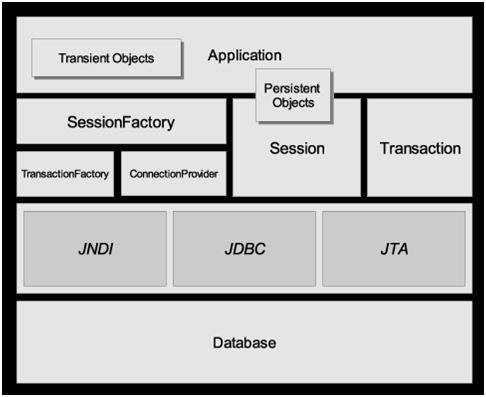
Hibernate Framework Objects
● SessionFactory
– Represented by org.hibernate.SessionFactory class
– A factory for Session and a client of ConnectionProvider
– Typically one for each database
– A threadsafe (immutable) cache of compiled mappings for a single database
– Might hold an optional (second-level) cache of data that is reusable between transactions, at a processor cluster-level
● Session
– Represented by org.hibernate.Session
– A single-threaded, short-lived object representing a conversation between the application and the persistent store
– Wraps a JDBC connection
– Factory for Transaction
– Holds a mandatory (first-level) cache of persistent objects, used when navigating the object graph or looking up objects by identifier
● Persistent objects and collections
– Short-lived, single threaded objects containing persistent state and business function
– These might be ordinary JavaBeans/POJOs, the only special thing about them is that they are currently associated with (exactly one) Session
– Changes made to persistent objects are reflected to the database tables (when they are committed)
– As soon as the Session is closed, they will be detached and free to use in any application layer (e.g. directly as data transfer objects to and from presentation)
● Transient and detached objects
– Instances of persistent classes that are not currently associated with a Session, thus without a persistent context
– They may have been instantiated by the application and not (yet) persisted or they may have been instantiated by a closed Session
– Changes made to Transient and detached objects do not get reflected to the database table
● Transaction
– Represented by org.hibernate.Transaction
– A single-threaded, short-lived object used by the application to specify atomic units of work
– Abstracts application from underlying JDBC, JTA or CORBA transaction.
– A Session might span several Transactions in some cases.
– However, transaction demarcation, either using the underlying API or Transaction, is never optional!
● ConnectionProvider
– Represented by org.hibernate.connection.ConnectionProvider
– A factory for (and pool of) JDBC connections.
– Abstracts application from underlying Datasource or DriverManager.
– Not exposed to application, but can be extended/implemented by the developer
● TransactionFactory
– Represented by org.hibernate.TransactionFactory
– A factory for Transaction instances.
– Not exposed to the application, but can be extended/implemented by the developer
Instance States
● An instance of a persistent classes may be in one of three different states, which are defined with respect to a persistence context
– transient
– persistent
– detached
● The persistence context is represented by Hibernate Session object
● “transient” state
– The instance is not, and has never been associated with any session (persistence context)
– It has no persistent identity (primary key value)
– It has no corresponding row in the database
– ex) When POJO instance is created
● “persistent” state
– The instance is currently associated with a session (persistence context).
– It has a persistent identity (primary key value) and a corresponding row in the database
– ex) When POJO instance is persisted
● “detached”
– The instance was once associated with a persistence context, but that context was closed, or the instance was serialized to another process
– It has a persistent identity and, perhaps, a corresponding row in the database
– Used when POJO object instance needs to be sent over to another program for manipulation without having persistent context
State Transitions
● Transient instances may be made persistent by calling save(), persist() or saveOrUpdate()
● Persistent instances may be made transient by calling delete()
● Any instance returned by a get() or load() method is persistent
● Detached instances may be made persistent by calling update(), saveOrUpdate(), lock() or replicate()
● The state of a transient or detached instance may also be made persistent as a new persistent instance by calling merge().
Lifecycle Operations
● Session interface provides methods for lifecycle operations
● Result of lifecycle methods affect the instance state
– Saving objects
– Loading objects
– Getting objects
– Refreshing objects
– Updating objects
– Deleting objects
– Querying objects
Saving Objects
● Creating an instance of a class you map with Hibernate mapping does not automatically persist the object to the database until you save the object with a valid Hibernate session
– An object remains to be in “transient” state until it is saved and moved into “persistent” state
● The class of the object that is being saved must have a mapping file (myclass.hbm.xml)
● Saving object generates org.hibernate.event.SaveOrUpdateEvent
Java methods for saving objects
● From Session interface
– public Serializable save(Object object)
– public void save(Object object, Serializable id)
– public Serializable save(String entityName, Object object)
Example: Saving Objects
● Note that the Person is a POJO class with a mapping file (person.hbm.xml)
Person person = new Person();
person.setName(“Sang Shin”);
session.save(person);
Loading Objects
● Used for loading objects from the database
● Each load(..) method requires object's primary key as an identifier
– The identifier must be Serializable – any primitive identifier must be converted to object
● Each load(..) method also requires which domain class or entity name to use to find the object with the id
● The returned object, which is returned as Object type, needs to be type-casted to the domain class
Java methods for loading objects
● From Session interface
– public Object load(Class theClass, Serializable id)
– public Object load(String entityName, Serializable id)
– public void load(Object object, Serializable id)
load() vs. get()
● Only use the load() method if you are sure that the object exists
– load() method will throw an exception if the unique id is not found in the database
● If you are not sure that the object exists, then use one of the get() methods
– get() method will return null if the unique id is not found in the database
Java methods for getting objects
● From Session interface
– public Object get(Class theClass, Serializable id)
– public Object get(String entityName, Serializable id)
Example: Getting Objects
Person person = (Person) session.get(Person.class, id);
if (person == null){
System.out.println(“Person is not found for id ” + id);
}
Refreshing Objects
● Used to refresh objects from their database representations in cases where there is a possibility of persistent object is not in sync. with the database representation
● Scenarios you might want to do this
– Your Hibernate application is not the only application working with this data
– Your application executes some SQL directly against the database
– Your database uses triggers to populate properties on the object
Java methods for Refreshing objects
● From Session interface
– public void refresh(Object object)
Updating Objects
● Hibernate automatically manages any changes made to the persistent objects
– The objects should be in “persistent” state not transient state
● If a property changes on a persistent object, Hibernate session will perform the change in the database (possibly by queuing them first)
● From developer perspective, you do not have to any work to store these changes to the database
● You can force Hibernate to commit all of tis changes using flush() method
● You can also determine if the session is dirty through isDirty() method
Deleting Objects
● Removes an object from the database
Querying Objects
● Hibernate provides 3 different ways of querying objects
– Criteria API
– HQL
– Native SQL
Life-cycle Operations and SQL commands
● save() and persist() result in an SQL INSERT
● delete() results in an SQL DELETE
● update() or merge() result in an SQL UPDATE
● Changes to persistent instances are detected at flush time and also result in an SQL
UPDATE
● saveOrUpdate() and replicate() result in either an INSERT or an UPDATE
Cascading Operations
● Lifecycle operations can be cascaded
● Cascading configuration flags (specified in the mapping file)
– create
– merge
– delete
– save-update
– evict
– replicate
– lock
– refresh
Cascading Operations Example
<hibernate-mapping >
<class name="Event" table="events">
<id name="id" column="uid" type="long">
<generator class="increment"/>
</id>
<property name="name" type="string"/>
<property name="startDate" column="start_date"
type="date"/>
<property name="duration" type="integer"/>
<many-to-one name="location" column="location_id"
class="Location" cascade="save-update" />
</class>
</hibernate-mapping>
Persistent Classes
● Persistent classes are classes in an application that implement the entities of the business domain (e.g. Customer and Order in an E-commerce application)
● Hibernate works best if these classes follow some simple rules, also known as the Plain
Old Java Object (POJO) programming model.
● Hibernate3 assumes very little about the nature of your persistent objects
– You may express a domain model in other ways: using trees of Map instances, for example.
How to write a POJO Class
● Rule 1: Implement a no-argument
– All persistent classes must have a default constructor (which may be non-public) so that Hibernate can instantiate them using Constructor.newInstance()
● Rule 2: Provide an identifier property
– This property maps to the primary key column of a database table.
– The property might have been called anything, and its type might have been any primitive type, any primitive "wrapper" type, java.lang.String or java.util.Date
– The identifier property is strictly optional. You can leave them off and let Hibernate keep track of object identifiers internally – not recommended
● Rule 3: Declare accessors and mutators for persistent fields
– Hibernate persists JavaBeans style properties, and recognizes method names of the form getFoo, isFoo and setFoo
What is a DAO?
● DAO pattern
– Separation of data access (persistence) logic from business logic
– Enables easier replacement of database without affecting business logic
● DAO implementation strategies
– Runtime pluggable through factory class (most flexible)
– Domain DAO interface and implementation
– Domain DAO concrete classes
Example: PersonDaoInterface
public class PersonDaoInterface {
public void create(Person p) throws SomeException;
public void delete(Person p) throws SomeException;
public Person find(Long id) throws SomeException;
public List findAll() throws SomeException;
public void update(Person p) throws SomeException;
}
Transaction & Locking
Example: Transactional Operation
Session session = factory.openSession();
Transaction tx = null;
try {
tx = session.beginTransaction();
// Perform lifecycle operations
tx.commit();
tx = null;
} catch (HibernateException e){
if (tx != null) tx.rollback();
} finally {
session.close();
}
Hibernate Configuration
Two different ways of Configuring Hibernate
● Programmatic configuration
● XML configuration file
– Specify a full configuration in a file named hibernate.cfg.xml
– Can be used as a replacement for the hibernate.properties file or, if both are present, to override properties
– By default, is expected to be in the root of your classpath
– Externalization of the mapping file names to configuration is possible
XML Configuration File
<?xml version='1.0' encoding='utf-8'?>
<!DOCTYPE hibernate-configuration PUBLIC
"-//Hibernate/Hibernate Configuration DTD//EN"
"http://hibernate.sourceforge.net/hibernate-configuration-3.0.dtd">
<hibernate-configuration>
<!-- a SessionFactory instance listed as /jndi/name -->
<session-factory
name="java:hibernate/SessionFactory">
<!-- properties -->
<property
name="connection.datasource">java:/comp/env/jdbc/MyDB</property>
<property name="dialect">org.hibernate.dialect.MySQLDialect</property>
<property name="show_sql">false</property>
<property name="transaction.factory_class">
org.hibernate.transaction.JTATransactionFactory
</property>
<property
name="jta.UserTransaction">java:comp/UserTransaction</property>
<!-- mapping files -->
<mapping resource="org/hibernate/auction/Item.hbm.xml"/>
<mapping resource="org/hibernate/auction/Bid.hbm.xml"/>
<!-- cache settings -->
<class-cache class="org.hibernate.auction.Item" usage="read-write"/>
<class-cache class="org.hibernate.auction.Bid" usage="read-only"/>
<collection-cache collection="org.hibernate.auction.Item.bids"
usage="read-write"/>
</session-factory>
</hibernate-configuration>
Hibernate Mapping Files
● Object/relational mappings are usually defined in an XML document.
● The mapping document is designed to be readable and hand-editable.
● The mapping language is Java-centric, meaning that mappings are constructed around persistent class declarations, not table declarations.
● Can be generated from the Java source using Annotation (from Hibernate 3.x only) or XDoclet
● Defines identifier generation, versioning, persistent properties, and object relationships and the mapping of these to the database
Mapping classes to tables
● The class element
<class name="domain.Answer" table="answer" dynamic-pdate="false" dynamic-insert="false">
...
</class>
Mapping object properties to columns
● Use property element
<property
name="reason"
type="java.lang.String"
update="true"
insert="true"
column="reason"
not-nul=”true” />
Generating object identifiers
● Use the id element
<id name="id"
column="id"
type="java.lang.Long"
unsaved-value="null">
<generator class="native"/>
</id>
Mapping Id field
● Use id element
● Use generator subelement with class attribute, which specifies the key generation scheme
<class name="Person">
<id name="id" type="int">
<generator class="increment"/>
</id>
<property name="name" column="cname" type="string"/>
</class>
Key Generation Scheme via class attribute
● class=”increment”
– It generates identifiers of type long, short or int that are unique only when no other process is inserting data into the same table. It should not the used in the clustered environment.
● class=”assigned”
– Lets the application to assign an identifier to the object before save() is called. This is the default strategy if no <generator> element is specified.
● class=”native”
– It picks identity, sequence or hilo depending upon the capabilities of the underlying database.
Getting SessionFactory using XML configuration file
● With the XML configuration, starting Hibernate is then as simple as
SessionFactory sf = new Configuration().configure().buildSessionFactory();
● You can pick a different XML configuration file using
SessionFactory sf = new Configuration().configure("catdb.cfg.xml").buildSessionFactory();
Step By Step Guideline for Building & Running “HelloWorld” Hibernate Application
Steps for Starting the database and populating the tables
Step 1: Start the database
● 3 Different options
– At the command line
– Through an IDE
– As windows service (Not all databases support this)
● Derby within the IDE
– From NetBeans, select Tools->Java DB Database-
>Start Java DB Server
● HSQLDB at the command line
– Create a directory to host a database
● mkdir c:\hsqldb\sampledb
– Create server.properties under c:\hsqldb\sampledb with the following two lines
● server.database.0=file:/hsqldb/sampledb/
● server.dbname.0=sampledb
– Run the database server at the command line
● java -classpath ..\lib\hsqldb.jar org.hsqldb.Server
Step 2: Create Database Schema (Optional Step)
● 2 different options
– Manually
– Use SchemaExport utility tool that comes with Hibernate
● You can generate the database schema from the mapping files
● For this sample application, we will not create the schema, instead we will create or populate the database table either manually or programmatically (within Java program)
Step 3: Create and Populate the database tables
● 4 different options
– Running Schema (SQL commands) at the command line
– Running SQL command within the IDE
– Create the table manually using database manager tool or within the IDE
– From the Java program
Steps to follow for Writing files
1.Write domain classes (as POJO classes)
➢ Person.java
2.Write or generate Hibernate mapping files for the domain classes
➢ Person.hbm.xml
3.Write Hibernate configuration file
➢ hibernate.cfg.xml
Step 1: Write Domain Classes (Person.java)
public class Person implements Serializable {
private int id;
private String name;
protected Person() {
}
public Person(int id, String name) {
this.id = id;
this.name = name;
}
public int getId() {
return id;
}
public void setId(int id) {
this.id = id;
}
public String getName() {
return name;
}
public void setName(String name) {
this.name = name;
}
}
Step 2: Write Mapping Files for Domain Classes (Person.hbm.xml)
<?xml version="1.0"?>
<!DOCTYPE hibernate-mapping PUBLIC
"-//Hibernate/Hibernate Mapping DTD 3.0//EN"
"http://hibernate.sourceforge.net/hibernate-mapping-3.0.dtd">
<hibernate-mapping>
<class name="Person" table="person">
<id name="id" type="int">
<generator class="increment"/>
</id>
<property name="name" column="cname" type="string"/>
</class>
</hibernate-mapping>
Step 3: Write Hibernate configuration file (hibernate.cfg.xml) – Derby
<?xml version='1.0' encoding='utf-8'?>
<!DOCTYPE hibernate-configuration PUBLIC
"-//Hibernate/Hibernate Configuration DTD//EN"
"http://hibernate.sourceforge.net/hibernate-configuration-3.0.dtd">
<hibernate-configuration>
<session-factory>
<!-- Database connection settings -->
<property
name="connection.driver_class">org.apache.derby.jdbc.ClientDriver</property>
<property
name="connection.url">jdbc:derby://localhost:1527/mydatabase</property>
<property name="connection.username">app</property>
<property name="connection.password">app</property>
<!-- SQL dialect -->
<property name="dialect">org.hibernate.dialect.DerbyDialect</property>
<!-- Echo all executed SQL to stdout -->
<property name="show_sql">false</property>
<!-- Mapping files -->
<mapping resource="Person.hbm.xml"/>
</session-factory>
Step 3: Write Hibernate configuration file (hibernate.cfg.xml) – MySQL
<?xml version='1.0' encoding='utf-8'?>
<!DOCTYPE hibernate-configuration
PUBLIC "-//Hibernate/Hibernate Configuration DTD//EN"
"http://hibernate.sourceforge.net/hibernate-configuration-3.0.dtd">
<hibernate-configuration>
<session-factory>
<property name="connection.driver_class">com.mysql.jdbc.Driver</property>
<property name="connection.url">jdbc:mysql://localhost:3306/test</property>
<property name="connection.username"></property>
<property name="connection.password"></property>
<property name="show_sql">true</property>
<property name="dialect">org.hibernate.dialect.MySQLDialect</property>
<property name="myeclipse.connection.profile">mysql</property>
<mapping resource="Person.hbm.xml" />
</session-factory>
</hibernate-configuration>
Steps to follow for Building and Running the application
1.Add Hibernate library files to the classpath
2.Add the database driver to the classpath
3.Compile and run the application performing database operation
Step 1: Copy Hibernate Library Files to the classpath
● Hibernate library files from Hibernate distribution
– hibernate3.jar
– other dependency files
Step 2: Add the database driver to the classpath
● The application as a database client needs to have database-specific database driver
– derbyclient.jar (for Derby)
– hsqldb.jar (for HSQLDB)
– mysql-connector-java-5.0.3-bin.jar (for MySql)
Step 3: Compile and run the application
● As a standalone application or Web application
● In this example, we will run it as a standalone application (that has a main() method)
Step 1: Start the database
● 3 Different options
– At the command line
– Through an IDE
– As windows service (Not all databases support this)
● Derby within the IDE
– From NetBeans, select Tools->Java DB Database-
>Start Java DB Server
● HSQLDB at the command line
– Create a directory to host a database
● mkdir c:\hsqldb\sampledb
– Create server.properties under c:\hsqldb\sampledb with the following two lines
● server.database.0=file:/hsqldb/sampledb/
● server.dbname.0=sampledb
– Run the database server at the command line
● java -classpath ..\lib\hsqldb.jar org.hsqldb.Server
Step 2: Create Database Schema (Optional Step)
● 2 different options
– Manually
– Use SchemaExport utility tool that comes with Hibernate
● You can generate the database schema from the mapping files
● For this sample application, we will not create the schema, instead we will create or populate the database table either manually or programmatically (within Java program)
Step 3: Create and Populate the database tables
● 4 different options
– Running Schema (SQL commands) at the command line
– Running SQL command within the IDE
– Create the table manually using database manager tool or within the IDE
– From the Java program
Steps to follow for Writing files
1.Write domain classes (as POJO classes)
➢ Person.java
2.Write or generate Hibernate mapping files for the domain classes
➢ Person.hbm.xml
3.Write Hibernate configuration file
➢ hibernate.cfg.xml
Step 1: Write Domain Classes (Person.java)
public class Person implements Serializable {
private int id;
private String name;
protected Person() {
}
public Person(int id, String name) {
this.id = id;
this.name = name;
}
public int getId() {
return id;
}
public void setId(int id) {
this.id = id;
}
public String getName() {
return name;
}
public void setName(String name) {
this.name = name;
}
}
Step 2: Write Mapping Files for Domain Classes (Person.hbm.xml)
<?xml version="1.0"?>
<!DOCTYPE hibernate-mapping PUBLIC
"-//Hibernate/Hibernate Mapping DTD 3.0//EN"
"http://hibernate.sourceforge.net/hibernate-mapping-3.0.dtd">
<hibernate-mapping>
<class name="Person" table="person">
<id name="id" type="int">
<generator class="increment"/>
</id>
<property name="name" column="cname" type="string"/>
</class>
</hibernate-mapping>
Step 3: Write Hibernate configuration file (hibernate.cfg.xml) – Derby
<?xml version='1.0' encoding='utf-8'?>
<!DOCTYPE hibernate-configuration PUBLIC
"-//Hibernate/Hibernate Configuration DTD//EN"
"http://hibernate.sourceforge.net/hibernate-configuration-3.0.dtd">
<hibernate-configuration>
<session-factory>
<!-- Database connection settings -->
<property
name="connection.driver_class">org.apache.derby.jdbc.ClientDriver</property>
<property
name="connection.url">jdbc:derby://localhost:1527/mydatabase</property>
<property name="connection.username">app</property>
<property name="connection.password">app</property>
<!-- SQL dialect -->
<property name="dialect">org.hibernate.dialect.DerbyDialect</property>
<!-- Echo all executed SQL to stdout -->
<property name="show_sql">false</property>
<!-- Mapping files -->
<mapping resource="Person.hbm.xml"/>
</session-factory>
Step 3: Write Hibernate configuration file (hibernate.cfg.xml) – MySQL
<?xml version='1.0' encoding='utf-8'?>
<!DOCTYPE hibernate-configuration
PUBLIC "-//Hibernate/Hibernate Configuration DTD//EN"
"http://hibernate.sourceforge.net/hibernate-configuration-3.0.dtd">
<hibernate-configuration>
<session-factory>
<property name="connection.driver_class">com.mysql.jdbc.Driver</property>
<property name="connection.url">jdbc:mysql://localhost:3306/test</property>
<property name="connection.username"></property>
<property name="connection.password"></property>
<property name="show_sql">true</property>
<property name="dialect">org.hibernate.dialect.MySQLDialect</property>
<property name="myeclipse.connection.profile">mysql</property>
<mapping resource="Person.hbm.xml" />
</session-factory>
</hibernate-configuration>
Steps to follow for Building and Running the application
1.Add Hibernate library files to the classpath
2.Add the database driver to the classpath
3.Compile and run the application performing database operation
Step 1: Copy Hibernate Library Files to the classpath
● Hibernate library files from Hibernate distribution
– hibernate3.jar
– other dependency files
Step 2: Add the database driver to the classpath
● The application as a database client needs to have database-specific database driver
– derbyclient.jar (for Derby)
– hsqldb.jar (for HSQLDB)
– mysql-connector-java-5.0.3-bin.jar (for MySql)
Step 3: Compile and run the application
● As a standalone application or Web application
● In this example, we will run it as a standalone application (that has a main() method)
Hibernate Basics
Topics
• Why use Object/Relational Mapping(ORM)?
• What is and Why Hibernate?
• Hibernate architecture
• Instance states
• Persistence lifecycle operations
• DAOs
• Transaction
• Configuration
• SessionFactory
• Domain class
• Composite primary key
Why Use ORM?
Why Object/Relational Mapping?
• A major part of any enterprise application development project is the persistence layer
– Accessing and manipulate persistent data typically with relational database
• ORM handles Object-relational impedance mismatch
– Data lives in the relational database, which is table driven (with rows and columns)
● Relational database is designed for fast query operation of table-driven data
– We want to work with objects, not rows and columns of table
What is & Why Hibernate?
What is Hibernate?
● Object/relational mapping framework for enabling transparent POJO persistence
– Let you work without being constrained by tabledriven relational database model – handles Object- Relational impedance mismatch
● Lets you build persistent objects following common OO programing concepts
– Association
– Inheritance
– Polymorphism
– Composition
– Collection API for “many” relationship
Why use Hibernate?
● Allows developers focus on domain object modelling not the persistence plumbing
● Performance
– High performance object caching
– Configurable materialization strategies
● Sophisticated query facilities
– Criteria API
– Query By Example (QBE)
– Hibernate Query Language (HQL)
– Native SQL
Hibernate Architecture

● The architecture abstracts the application away from the underlying JDBC/JTA APIs
and lets Hibernate take care of the plumbing details.

Hibernate Framework Objects
● SessionFactory
– Represented by org.hibernate.SessionFactory class
– A factory for Session and a client of ConnectionProvider
– Typically one for each database
– Maintains a threadsafe (immutable) cache of compiled mappings for a single database
– Might hold an optional (second-level) cache of data that is reusable between transactions, at a processor cluster-level
● Session
– Represented by org.hibernate.Session
– The life of a Session is bounded by the beginning and end of a logical transaction.
– A session represents a persistence context
– Handles life-cycle operations- create, read and delete operations - of persistent objects
– A single-threaded, short-lived object representing a conversation between the application and the persistent store
– Wraps a JDBC connection
– Factory for Transaction
● Persistent objects and collections
– Short-lived, single threaded objects containing persistent state and business function
– These might be ordinary JavaBeans/POJOs, the only special thing about them is that they are currently associated with (exactly one) Session
– Changes made to persistent objects are reflected to the database tables (when they are committed)
– As soon as the Session is closed, they will be detached and free to use in any application layer (e.g. directly as data transfer objects to and from presentation)
● Transient and detached objects
– Instances of persistent classes that are not currently associated with a Session, thus without a persistent context
– They may have been instantiated by the application and not (yet) persisted or they may have been instantiated by a closed Session
– Changes made to transient and detached objects do not get reflected to the database table
● They need to be persisted or merged before the change get reflected to the database table
● Transaction
– Represented by org.hibernate.Transaction
– A single-threaded, short-lived object used by the application to specify atomic units of work
– Abstracts application from underlying JDBC, JTA or CORBA transaction.
– A Session might span several Transactions in some cases.
– However, transaction demarcation, either using the underlying API or Transaction, is never optional!
● ConnectionProvider
– Represented by org.hibernate.connection.ConnectionProvider
– A factory for (and pool of) JDBC connections.
– Abstracts application from underlying Datasource or DriverManager.
– Not exposed to application, but can be extended/implemented by the developer
● TransactionFactory
– Represented by org.hibernate.TransactionFactory
– A factory for Transaction instances.
– Not exposed to the application, but can be extended/implemented by the developer
Instance States
● An instance of a persistent classes may be in one of three different states, which are
defined with respect to a persistence context
– transient (does not belong to a persistence context)
– persistent (belongs to a persistence context)
– detached (used to belong to a persistence context)
● The persistence context is represented by Hibernate Session object
● “transient” state
– The instance is not, and has never been associated with any session (persistence context)
– It has no persistent identity (primary key value)
– It has no corresponding row in the database
– ex) When POJO instance is created outside of a session
● “persistent” state
– The instance is currently associated with a session
(persistence context).
– It has a persistent identity (primary key value) and likely to have a corresponding row in the database
– ex) When an object is created within a session or a
transient object gets persisted
● “detached”
– The instance was once associated with a persistence context, but that context was closed, or the instance was serialized to another process
– It has a persistent identity and, perhaps, a corresponding row in the database
– Used when POJO object instance needs to be sent over to another program for manipulation without having persistent context
State Transitions
● Transient instances may be made persistent by calling save(), persist() or saveOrUpdate()
● Persistent instances may be made transient by calling delete()
● Any instance returned by a get() or load() method is persistent
● Detached instances may be made persistent by calling update(), saveOrUpdate(), lock() or replicate()
● The state of a transient or detached instance may also be made persistent as a new
persistent instance by calling merge().
Methods of Session Interface
Types of Methods in Session Class
● Life cycle operations
● Transaction and Locking
● Managing resources
● JDBC Connection
Lifecycle Operations
● Session interface provides methods for lifecycle operations
● Result of lifecycle operations affect the instance state
– Saving objects
– Loading objects
– Getting objects
– Refreshing objects
– Updating objects
– Deleting objects
– Replicating objects
Saving Objects
● Creating an instance of a class you map with Hibernate mapping does not automatically
persist the object to the database until you save the object with a valid Hibernate
session
– An object remains to be in “transient” state until it is saved and moved into “persistent” state
● The class of the object that is being saved must have a mapping file (myclass.hbm.xml)
Java methods for saving objects
● From Session interface
// Persist the given transient instance,
// first assigning a generated identifier.
public Serializable save(Object object)
public Serializable save(String entityName, Object object)
Example: Saving Objects
● Note that the Person is a POJO class with a
mapping file (person.hbm.xml)
Person person = new Person();
person.setName(“Suresh Rohan”);
session.save(person);
// You can get an identifier
Object identifier = session.getIdentifier(person);
Loading Objects
● Used for loading objects from the database
● Each load(..) method requires object's primary key as an identifier
– The identifier must be Serializable – any primitive identifier must be converted to object
● Each load(..) method also requires which domain class or entity name to use to find
the object with the id
● The returned object, which is returned as Object type, needs to be type-casted to a
domain class
Java methods for loading objects
● From Session interface
// Return the persistent instance of the given entity
// class with the given identifier, assuming that the
// instance exists.
public Object load(Class theClass, Serializable id)
// Return the persistent instance of the given entity
// class with the given identifier, obtaining the specified
// lock mode, assuming the instance exists.
public Object load(Class theClass, Serializable id, LockMode lockMode)
public Object load(String entityName, Serializable id)
public void load(Object object, Serializable id)
Getting Objects
● Works like load() method
load() vs. get()
● Only use the load() method if you are sure that the object exists
– load() method will throw an exception if the unique id is not found in the database
● If you are not sure that the object exists, then use one of the get() methods
– get() method will return null if the unique id is not found in the database
Java methods for getting objects
● From Session interface
// Return the persistent instance of the given entity
// class with the given identifier, or null if there is no
// such persistent instance.
public Object get(Class theClass, Serializable id)
public Object get(String entityName, Serializable id)
Example: Getting Objects
Person person = (Person) session.get(Person.class, id);
if (person == null){
System.out.println(“Person is not found for id ” + id);
}
Refreshing Objects
● Used to refresh objects from their database representations in cases where there is a
possibility of persistent object is not in sync. with the database representation
● Scenarios you might want to do this
– Your Hibernate application is not the only application working with this data
– Your application executes some SQL directly against the database
– Your database uses triggers to populate properties on the object
● Use it with caution
Java methods for Refreshing objects
● From Session interface
// Re-read the state of the given instance from the
// underlying database.
public void refresh(Object object)
public void refresh(Object object, LockMode lockMode)
Updating Objects
● Hibernate automatically manages any changes made to the persistent objects
– The objects should be in “persistent” state not transient state
● If a property changes on a persistent object, Hibernate session will perform the change in the database when a transaction is committed (possibly by queuing the changes
first)
● From developer perspective, you do not have to any work to store these changes to the database
● You can force Hibernate to commit all of tis changes using flush() method
● You can also determine if the session is dirty through isDirty() method
Deleting Objects
● From Session interface
// Remove a persistent instance from the datastore.
// The argument may be an instance associated with
// the calling Session or a transient instance with
// an identifier associated with existing persistent
// state. This operation cascades to associated
// instances if the association is mapped with
// cascade="delete".
public void delete(Object object)
public void delete(String entityName, Object object)
Replicating Objects
● From Session Interface
// Persist the state of the given detached instance,
// reusing the current identifier value.
public void replicate(Object object, ReplicationMode replicationMode)
Life-cycle Operations and SQL commands
● save() and persist() result in an SQL INSERT
● delete() results in an SQL DELETE
● update() or merge() result in an SQL UPDATE
● Changes to persistent instances are detected at flush time and also result in an SQL
UPDATE
● saveOrUpdate() and replicate() result in either an INSERT or an UPDATE
Cascading
Cascading Operations
● Lifecycle operations can be cascaded
● Cascading configuration flags (specified in the mapping file)
– create
– merge
– delete
– save-update
– evict
– replicate
– lock
– refresh
Cascading Operations Example
<hibernate-mapping >
<class name="Event" table="events">
<id name="id" column="uid" type="long">
<generator class="increment"/>
</id>
<property name="name" type="string"/>
<property name="startDate" column="start_date"
type="date"/>
<property name="duration" type="integer"/>
<many-to-one name="location" column="location_id"
class="Location" cascade="save-update" />
</class>
</hibernate-mapping>
POJO as Domain Classes
Domain Classes
● Domain classes are classes in an application that implement the entities of the business
domain (e.g. Customer and Order in an Ecommerce application)
● Hibernate works best if these classes follow some simple rules, also known as the Plain
Old Java Object (POJO) programming model.
● Hibernate3 assumes very little about the nature of your domain classes
– You may express a domain model in other ways: using trees of Map instances, for example.
Steps to write a Domain Class
● Step 1: Implement a no-argument
● Step 2: Provide an identifier property
● Step 3: Create accessor methods
● Step 1: Implement a no-argument
– All persistent classes must have a default constructor so that Hibernate can instantiate them using Constructor.newInstance()
● Step 2: Provide an identifier property
– This property maps to the primary key column of a database
table.
– The property might have been called anything, and its type might have been any primitive type, any primitive "wrapper" type, java.lang.String or java.util.Date
– Composite key is possible
– The identifier property is optional. You can leave them off and let Hibernate keep track of object identifiers internally – not recommended, however
● Step 3: Declare accessor methods for persistent fields
– Hibernate persists JavaBeans style properties, and recognizes method names of the form getFoo, isFoo and setFoo
Composite Primary Key
Example: Composite Primary Key Mapping
<hibernate-mapping>
<class
name="org.example.composite.Application"
table="APPLICATION">
<!-- applicationPK is another class the implements Serializable -->
<composite-id
name="applicationPK"
class="org.example.composite.ApplicationPK" >
<key-property name="collectorateCode" column="COLLECTORATE_CODE" type="string" />
<key-property name="applicationNumber" column="APPL_SNO" type="integer"/>
<key-property name="year" column="YEAR_NBR" type="integer"/>
</composite-id>
<!-- Normal properties of a java class -->
<property name="name" column="NAME" type="stringr"></property>
<property name="age" column="AGE" type="integer"></property>
</class>
</hibernate-mapping>
Example: Composite Key Class
public class ApplicationPK implements Serializable {
// declare composite properties (actually
// getter and setter methods)
// declare constructor
}
Example: Domain Class
public class Application {
private ApplicationPK applicationPK;
//declare other properties
//declare constructor
}
Example: Lifecycle operation
// Create composite primary key
applicationPK = new ApplicationPK(...);
// Perform load operation
SessionObject.load(Application.class, applicationPK)
Data Access Objects (DAOs)
What is a DAO?
● DAO pattern
– Separation of data access (persistence) logic from business logic
– Enables easier replacement of database without affecting business logic
● DAO implementation strategies
– Strategy 1: Runtime pluggable through factory class (most flexible)
– Strategy 2: Domain DAO interface and implementation
– Strategy 3: Domain DAO concrete classes
Example: PersonDaoInterface
public class PersonDaoInterface {
public void create(Person p) throws SomeException;
public void delete(Person p) throws SomeException;
public Person find(Long id) throws SomeException;
public List findAll() throws SomeException;
public void update(Person p) throws SomeException;
public WhateverType
whateverPersonRelatedMethod(Person p)
throws SomeException;
}
Hibernate Configuration
Two different ways of Configuring Hibernate
● Programmatic configuration
● XML configuration file
– Specify a full configuration in a file named hibernate.cfg.xml
– Can be used as a replacement for the hibernate.properties file or, if both are present, to override properties
– By default, is expected to be in the root of your classpath
– Externalization of the mapping file names through configuration is possible
Hibernate Configuration File
<?xml version='1.0' encoding='utf-8'?>
<!DOCTYPE hibernate-configuration PUBLIC
"-//Hibernate/Hibernate Configuration DTD//EN"
"http://hibernate.sourceforge.net/hibernate-configuration-3.0.dtd">
<hibernate-configuration>
<!-- a SessionFactory instance listed as /jndi/name -->
<session-factory
name="java:hibernate/SessionFactory">
<!-- properties -->
<property
name="connection.datasource">java:/comp/env/jdbc/MyDB</property>
<property name="dialect">org.hibernate.dialect.MySQLDialect</property>
<property name="show_sql">false</property>
<property name="transaction.factory_class">
org.hibernate.transaction.JTATransactionFactory
</property>
<property name="jta.UserTransaction">
java:comp/UserTransaction
</property>
<!-- mapping files -->
<mapping resource="org/hibernate/auction/Item.hbm.xml"/>
<mapping resource="org/hibernate/auction/Bid.hbm.xml"/>
<!-- cache settings -->
<class-cache class="org.hibernate.auction.Item" usage="read-write"/>
<class-cache class="org.hibernate.auction.Bid" usage="read-only"/>
<collection-cache collection="org.hibernate.auction.Item.bids"
usage="read-write"/>
</session-factory>
</hibernate-configuration>
Hibernate Mapping Files
● Object/relational mappings are usually defined in an XML document.
● The mapping document is designed to be readable and hand-editable.
● The mapping language is Java-centric, meaning that mappings are constructed around persistent class declarations, not table declarations.
● Can be generated from the Java source using Annotation (from Hibernate 3.x only) or XDoclet
● Defines identifier generation, versioning, persistent properties, and object relationships and the mapping of these to the database
Mapping Classes to Tables
● The class element
<class name="domain.Answer"
table="answer"
dynamic-update="false"
dynamic-insert="false">
...
</class>
Attributes of <class> element
<class
name="ClassName" (1)
table="tableName" (2)
discriminator-value="discriminator_value" (3)
mutable="true|false" (4)
schema="owner" (5)
catalog="catalog" (6)
proxy="ProxyInterface" (7)
dynamic-update="true|false" (8)
dynamic-insert="true|false" (9)
select-before-update="true|false" (10)
polymorphism="implicit|explicit" (11)
where="arbitrary sql where condition" (12)
persister="PersisterClass" (13)
batch-size="N" (14)
optimistic-lock="none|version|dirty|all" (15)
lazy="true|false" (16)
entity-name="EntityName" (17)
check="arbitrary sql check condition" (18)
rowid="rowid" (19)
subselect="SQL expression" (20)
abstract="true|false" (21)
node="element-name"
/>
● name: The fully qualified Java class name of the persistent class (or interface).
● table (optional - defaults to the unqualified class name): The name of its database table.
● discriminator-value (optional - defaults to the class name): A value that distinguishes
individual subclasses, used for polymorphic behaviour.
● dynamic-update (optional, defaults to false): Specifies that UPDATE SQL should be
generated at runtime and contain only those columns whose values have changed.
● dynamic-insert (optional, defaults to false): Specifies that INSERT SQL should be
generated at runtime and contain only the columns whose values are not null.
● optimistic-lock (optional, defaults to version): Determines the optimistic locking
strategy.
● lazy (optional): Lazy fetching may be
completely disabled by setting lazy="false".
Mapping Properties to Columns
Mapping object properties to columns
● Use property element
<property
name="reason"
type="java.lang.String"
update="true"
insert="true"
column="reason"
not-nul=”true” />
Attributes of <property> element
<property
name="propertyName"
column="column_name"
type="typename"
update="true|false"
insert="true|false"
formula="arbitrary SQL expression"
access="field|property|ClassName"
lazy="true|false"
unique="true|false"
not-null="true|false"
optimistic-lock="true|false"
generated="never|insert|always"
node="element-name|@attribute-name|element/@attribute|."
index="index_name"
unique_key="unique_key_id"
length="L"
precision="P"
scale="S"
/>
● name: the name of the property, with an initial lowercase letter.
● column (optional - defaults to the property name): the name of the mapped database
table column.
● unique (optional): Enable the DDL generation of a unique constraint for the columns.
● not-null (optional): Enable the DDL generation of a nullability constraint for the columns.
● optimistic-lock (optional - defaults to true): Specifies that updates to this property do or do not require acquisition of the optimistic lock. In other words, determines if a version increment should occur when this property is dirty.
● generated (optional - defaults to never): Specifies that this property value is actually
generated by the database
Mapping Id Field
● Use id element
● Use generator sub-element with class attribute, which specifies the key generation scheme
<class name="Person">
<id name="id" type="int">
<generator class="increment"/>
</id>
<property name="name" column="cname" type="string"/>
</class>
Key Generation Scheme via class attribute
● class=”increment”
– It generates identifiers of type long, short or int that are unique only when no other process is inserting data into the same table. It should not the used in the clustered
environment.
● class=”identity”
– Supports identity columns in DB2, MySQL, MS SQL Server, Sybase and HypersonicSQL.
● class=”hilo”
– Uses a hi/lo algorithm to efficiently generate identifiers of
type long, short or int, given a table and column
● class=”assigned”
– Lets the application to assign an identifier to the object before save() is called. This is the default strategy if no <generator> element is specified.
● class=”native”
– It picks identity, sequence or hilo depending upon the
capabilities of the underlying database.
● class=”uuid”
– Uses a 128-bit UUID algorithm to generate identifiers
Global Mapping
Attributes of <hibernate-mapping>
<hibernate-mapping
schema="schemaName" (1)
catalog="catalogName" (2)
default-cascade="cascade_style" (3)
default-access="field|property|ClassName" (4)
default-lazy="true|false" (5)
auto-import="true|false" (6)
package="package.name" (7)
/>
● schema (optional): The name of a database schema
● catalog (optional): The name of a database catalog.
● default-cascade (optional - defaults to none): A default cascade style.
● default-lazy (optional - defaults to true): The default value for unspecified lazy attributes of class and collection mappings.
Getting SessionFactory from XML configuration file
● With the XML configuration, starting Hibernate is then as simple as
SessionFactory sf = new Configuration().configure().buildSessionFactory();
● You can pick a different XML configuration file using
SessionFactory sf = new Configuration() .configure("catdb.cfg.xml").buildSessionFactory();